10 Steps for Migrating from Outdated Communication Infrastructure to Modern Secure Messaging Systems

For many enterprises, outdated communication infrastructure is more than just a tech issue — it is a ticking compliance time bomb.
Legacy email systems, unencrypted messaging platforms, and those siloed communication tools leave organizations exposed to regulatory risk, data breaches, and as well as operational inefficiencies. Modern secure messaging systems are no longer a luxury nowadays — they’re a necessity.
But leaping outdated tools to secure, compliant platforms?
Sure, it can feel overwhelming. But that’s where MailSPEC comes in.
This guide walks you through 10 essential steps to help your organization successfully navigate communication system migration without compromising on security, usability, or regulatory compliance.
1. Assess Your Current Communication Infrastructure
Now, before you can begin any migration, you need a clear picture of where you are now. That means conducting a full audit of your communication ecosystem:
- What messaging platforms are currently in use?
- Which systems are cloud-based vs. on-premise?
- Are there consumer apps (e.g., WhatsApp, Slack) being used unofficially?
- Where are the gaps in compliance and security?
This audit sets the foundation for building a roadmap toward modern secure messaging systems. You will then uncover which tools are still working — and which are putting your organization at risk.
2. Identify Compliance and Regulatory Requirements

Different industries face different compliance standards: Health Insurance Portability and Accountability Act of 1996 (HIPAA) for healthcare, General Data Protection Regulation (GDPR) in Europe, Financial Industry Regulatory Authority (FINRA) for finance, and so on. Migrating communication infrastructure requires a crystal-clear understanding of the regulations that apply to your industry.
Ask:
- What data retention rules do we need to follow?
- Are end-to-end encryption and audit logs required?
- What are the penalties for non-compliance?
Modern secure messaging systems — like MailSPEC — are purpose-built with these regulatory requirements in mind, ensuring you stay compliant without the need to reinvent the wheel.
3. Define Success Metrics
How will you know your communication infrastructure modernization has worked? Well.. let's clear benchmarks from the outset:
- Improved message delivery time
- Reduced use of unauthorized messaging apps
- Full encryption adoption across devices
- 100% compliance with industry regulations
Use these metrics to track progress and rally internal support for the upgrade to secure messaging.
4. Address Legacy System Replacement Challenges
One of the biggest hurdles in communication system migration is detangling from those legacy email systems and outdated messaging apps. These older platforms often house years — sometimes decades — of communication history.
Challenges you may face:
- Compatibility with modern formats
- Data integrity and message retention
- Security risks during the transition
But, hey, do not panic — MailSPEC offers migration support tools that streamline this process while ensuring no message is left behind.
5. Choose the Right Secure Messaging Platform Design
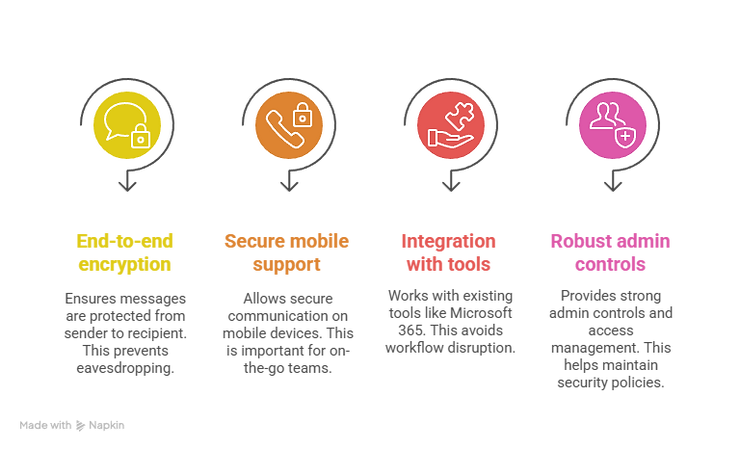
Not all secure enterprise messaging solutions are created equal. Hence, you need a platform that balances compliance, security, and usability.
Look for:
- End-to-end encryption
- Secure mobile communication support
- Integration with existing tools (e.g., Microsoft 365, Google Workspace)
- Robust admin controls and access management
MailSPEC’s platform checks all these boxes — and more — offering you a seamless upgrade to secure messaging without disrupting your team’s workflow.
6. Develop a Phased Migration Plan to Modern Secure Messaging Systems
Ripping off the Band-Aid rarely works in enterprise IT. And a phased approach ensures continuity, reduces user resistance, and minimizes risk.
Phased communication system migration may include:
- Pilot testing with one department
- Rolling out secure mobile messaging apps to remote teams first
- Gradual deprecation of legacy tools
- Scheduled data migration in batches
MailSPEC’s professional services team can help you create this tailored roadmap to support phased implementation — again, with minimal downtime.
7. Plan for Data Migration and Archival
Regulated industries often require years of message history to be preserved, searchable, and legally admissible. That means your communication infrastructure modernization must include:
- Data mapping between old and new systems
- Message format compatibility checks
- Secure data transfer protocols
- Verification of message integrity post-migration
MailSPEC’s secure messaging systems include built-in archiving and e-discovery tools, making it easy to migrate without losing access to historical data.
8. Engage Users with Training and Support
Say, you have the most secure messaging platform. Well, it will not help if your team does not use it. Successful adoption hinges on usability and support.
Tactics to encourage user adoption:
- Hands-on training sessions
- Quick-start guides and FAQs
- Incentives for early adopters
- Feedback loops to address issues
MailSPEC’s platform is designed with intuitive UX principles in mind, mirroring the ease of consumer apps while also maintaining enterprise-grade security. Meaning, your employees will just adopt the platform — they will prefer it.
9. Monitor, Optimize, and Scale
Now, once migration is underway, your job is not done here. It is still critical to:
- Monitor user engagement
- Analyze security event logs
- Identify bottlenecks or training gaps
- Continuously update configurations based on new threats or policies
MailSPEC provides real-time analytics and alerts to help IT and compliance teams stay proactive. So as your business grows, the platform easily scales too to support new departments, locations, and regulatory changes.
10. Establish Long-Term Governance and Review Cycles
A successful communication infrastructure is not simply just "modern" — it is sustainable. Post-migration, establish a governance plan that includes:
- Annual compliance audits
- Regular policy reviews
- User access reevaluation
- Updates to training materials
Secure enterprise messaging is not a one-and-done project. It is in fact an evolving discipline that requires ongoing commitment. And with MailSPEC’s continuous support and updates, your system stays aligned with both your business needs and regulatory landscape.
Modern Secure Messaging Systems' Budgeting and Timeline Considerations for Migration
Every enterprise migration will have its budget constraints and timeline expectations. Now, here’s how to approach both:
Cost Planning:
- Factor in software licenses, professional services, and internal labor
- Account for downtime or potential productivity dips during transition
- Consider the long-term ROI of better compliance and reduced risk
Timeline Planning:
- Set realistic expectations — most migrations take 3 to 6 months, depending on siz.e
- Build in contingency buffers for setbacks
- Use a Gantt chart or visual roadmap to track milestones
MailSPEC offers customized quotes, too, based on your organization's size and complexity, ensuring you get an accurate picture before beginning your upgrade to secure messaging.
So, Why Choose MailSPEC for Your Communication System Migration?
Here at MailSPEC, we do not just provide modern secure messaging systems — we partner with you through the entire migration journey. Our platform offers:
- Compliance-ready architecture
- Secure mobile messaging support
- Professional services for data migration
- User-centric design to drive adoption
- Real-time monitoring and alerts
And whether you are replacing a legacy system or modernizing your infrastructure from scratch, we make the process seamless, secure, and scalable.
Ready to Modernize Your Messaging?
Do not let outdated communication systems put your business at risk.
Modern secure messaging systems are the future of enterprise communication — and the sooner you migrate, the safer, more compliant, and more efficient your organization will be.
Connect with MailSPEC today to schedule a consultation, request a demo, or start building your migration roadmap.
MailSPEC: Because secure communication isn’t optional — it’s essential.